
Automate Anything with AI

Build Agents, Voice Agents & Workflows in n8n

Go from your first no-code AI workflow to advanced RAG, MCP, multi-agent systems, voice agents, and real-world business automations — one practical build at a time.

Lifetime access · Downloadable lessons · Learn at your own pace · 7-day refund policy

Stop treating AI like a chatbot.

Learn how to connect AI to the tools you already use, give it access to data, let it take actions, build agents that can reason across workflows, create conversational voice systems, and automate real business processes using n8n.

Whether you're starting with no-code automation or want to build more advanced AI systems, Automate Anything with AI gives you a structured path from the fundamentals to production-style projects.

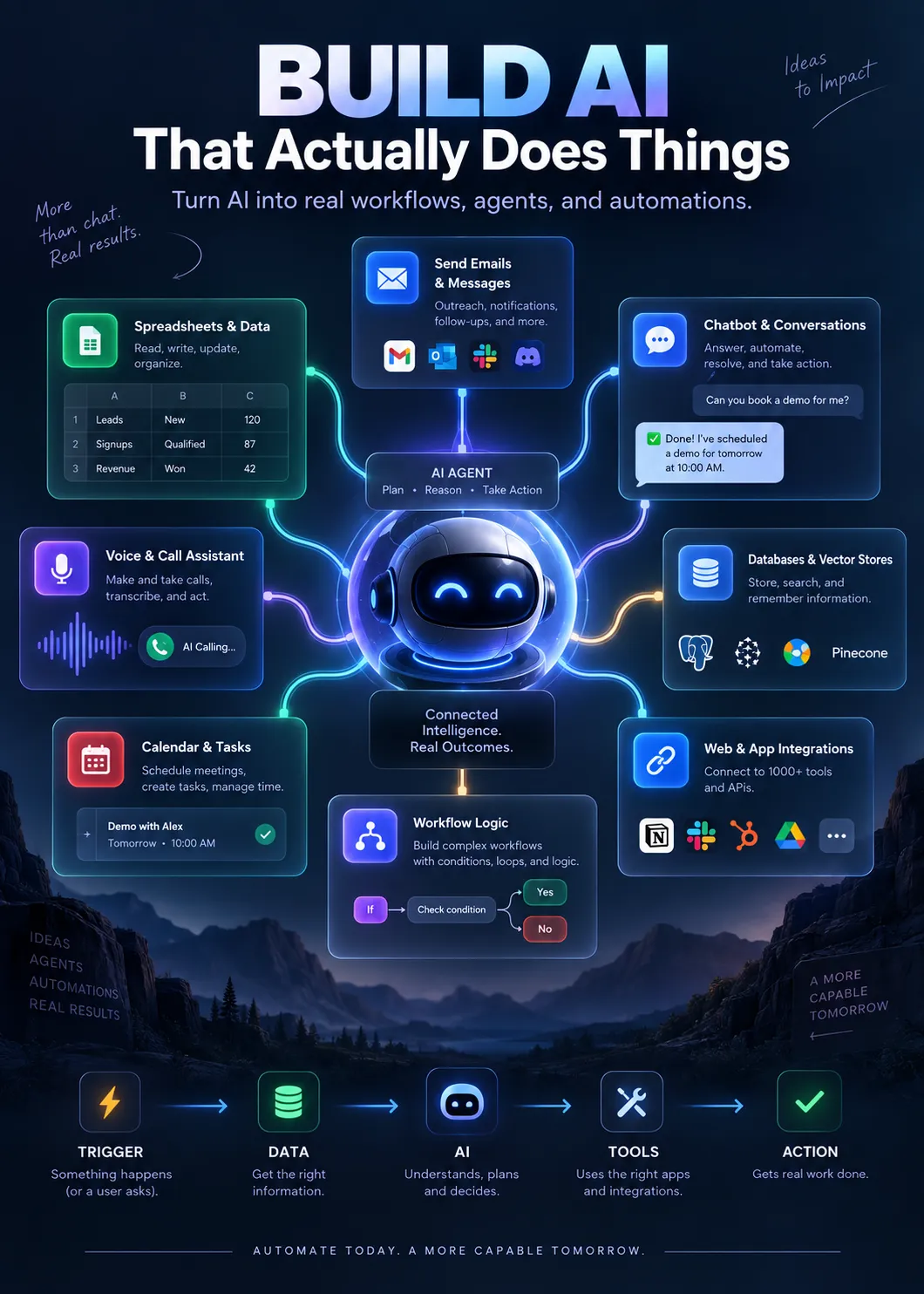
Build AI That Actually Does Things

Most AI courses stop at prompting. This one starts where prompting ends. You will learn how to create AI systems that can:

  • Receive and process information

  • Connect with external applications

  • Call tools and APIs

  • Read and write data

  • Send emails and notifications

  • Work with Google Sheets and Drive

  • Power Telegram and Slack bots

  • Use voice through ElevenLabs

  • Retrieve knowledge using RAG

  • Store and search embeddings

  • Connect through MCP

  • Coordinate multiple AI agents

  • Automate CRM and sales processes

  • Book meetings

  • Handle leads

  • Trigger multi-step workflows

  • Run locally or in the cloud

All using practical workflows built around n8n and modern AI tools.
BUILD YOUR OWN AI AUTOMATION SYSTEMS
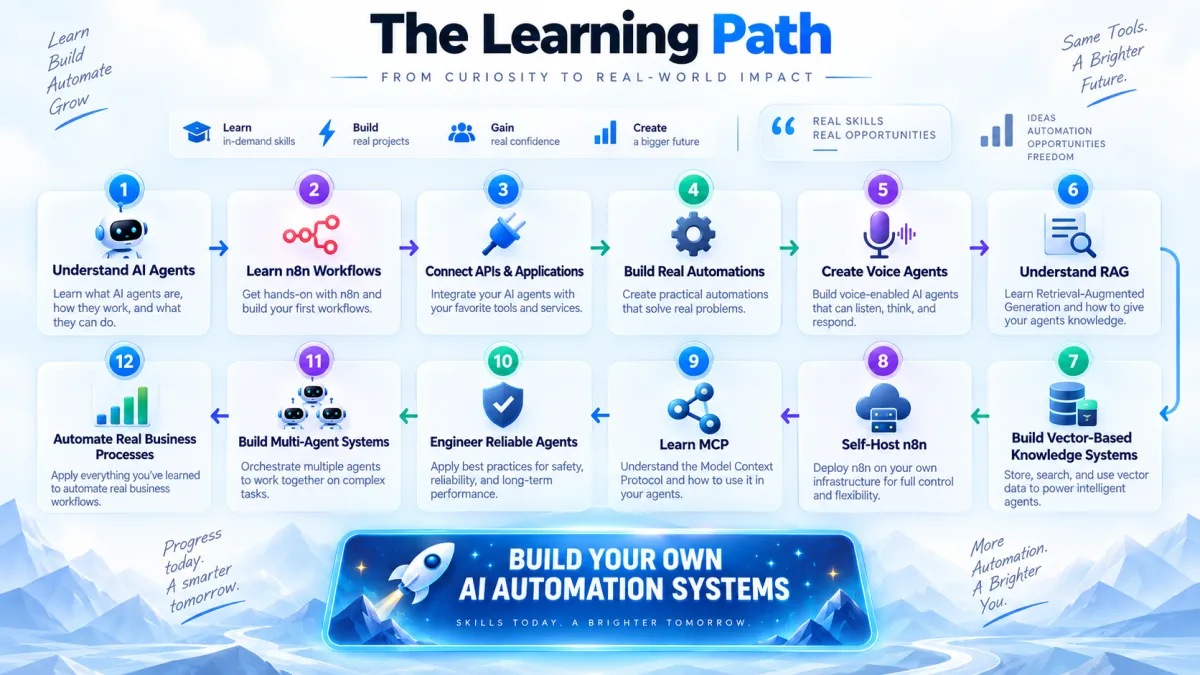
Full Course Curriculum

Course Content

3 sections  •  85 lectures  •  14h 08m total length
Section 1 · Week 1

Automate with Workflows in n8n Cloud

Start from zero and build working AI agents connected to real tools, while learning the foundations of n8n, APIs, tool calling, JSON, authentication and workflow logic.

Day 1: Your First AI Agent 5 lectures • 1h 01m
1. Build Your First AI Agent with n8n and OpenRouter (No-Code Tutorial) 12:28
2. Build AI Agents with n8n: Complete Learning Roadmap & Workflow Setup 11:34
3. How to Build an AI Agent with n8n and OpenAI API Integration 16:02
4. OpenAI API Setup: Cost Optimization and Free Alternatives Guide 12:06
5. What Is an AI Agent? Understanding Agentic Workflows in n8n 09:01
Day 2: How AI Agents Actually Work 6 lectures • 55min
6. How LLMs Create the Illusion of Memory and Reasoning in AI 12:17
7. How to Build AI Workflows with n8n: Nodes, Triggers and Automation 12:14
8. How to Evaluate AI Agents: Stop Anthropomorphizing LLMs in Workflows 05:06
9. How to Navigate n8n Cloud: Admin Panel, Instance and Canvas Tutorial 09:49
10. How Tool Calling Works in Agentic AI Systems and LLM Workflows 08:19
11. Understanding Agentic AI: How AI Agents Work with LLMs and Prompts 07:19
Day 3: Google Workspace Automations 4 lectures • 35min
12. How to Automate a Stock Portfolio Tracker with n8n and Google Sheets 11:04
13. How to Build an AI Agent to Automatically Draft Gmail Replies in n8n 10:57
14. How to Build an AI Workflow in n8n with Google Drive Integration 06:27
15. How to Integrate Google Sheets and Google Drive with n8n Workflows 06:51
Day 4: Chat Platforms, Authentication & JSON 7 lectures • 1h 14m
16. Connect Slack to n8n Using OAuth2 and Webhook Triggers, Step by Step 13:39
17. Create a Telegram Bot Using n8n: Complete AI Chatbot Integration Tutorial 10:34
18. How to Build a Slack Bot with n8n OAuth Integration and Automation 10:04
19. How to Integrate Pushover Notifications with n8n Workflows 07:08
20. How to Integrate a Telegram Bot with n8n AI Agent Workflow Automation 10:52
21. n8n Authentication Methods: API Keys, OAuth2 and Workflow Integration 13:03
22. Understanding JSON in n8n: Key-Value Pairs, Objects and Arrays 08:42
Day 5: Autonomy, Logic & Your First Real Builds 6 lectures • 1h 02m
23. Agentic AI Workflow Automation: Balance Autonomy and Instructions 10:01
24. Build an AI-Powered Portfolio Rebalancer Using n8n and Google Sheets 08:33
25. How to Integrate Gmail and Pushover Notifications with an n8n AI Agent 09:39
26. n8n JSON Workflow Tutorial: Webhooks, Authentication & Integration 09:04
27. n8n Node Types Explained: Core Nodes, Subnodes and Cluster Nodes 10:11
28. n8n Workflow Automation: Using If Nodes for Conditional Logic 14:19
Section 2 · Week 2

Accelerate with Voice Agents and RAG

Build conversational AI voice agents, connect them to n8n, understand RAG and embeddings, and give your AI access to knowledge stored in vector databases.

Day 1: Your First Voice Agent 4 lectures • 31min
29. How to Build AI Voice Agents with the ElevenLabs Agent Platform08:13
30. Build Your First AI Voice Agent with ElevenLabs Conversational AI09:14
31. ElevenLabs Voice Agent Tools: Deploy Conversational AI with Widgets05:46
32. Building Multi-Agent Workflows with ElevenLabs Voice AI Agents07:20
Day 2: Connecting Voice AI to n8n 6 lectures • 57min
33. ElevenLabs n8n Integration: Building Conversational AI Voice Agents10:16
34. Automate Text-to-Speech Using the ElevenLabs API in n8n Workflows12:03
35. How to Build a Voice AI Agent with n8n Webhook and ElevenLabs API09:28
36. Build an AI Voice Agent with n8n, ElevenLabs and Gemini Workflow05:04
37. How to Connect an ElevenLabs AI Voice Agent to an n8n Workflow with Webhooks10:56
38. How to Connect an ElevenLabs AI Voice Agent to n8n Using Webhooks09:42
Day 3: How RAG Works 4 lectures • 35min
39. What Is RAG in AI? Retrieval-Augmented Generation Explained10:33
40. How Embedding Models Enable Semantic Search in RAG Systems08:58
41. How RAG Works: Vector Databases and Semantic Search Explained06:39
42. Agentic RAG vs Traditional RAG: Building Smarter AI Retrieval Systems09:12
Day 4: Building the RAG Pipeline 6 lectures • 55min
43. Building RAG Pipelines with a Supabase Vector Database and Embeddings11:45
44. How to Use n8n and Supabase Integration for an AI-Powered RAG System10:02
45. Building a RAG Pipeline with n8n and Supabase Vector Store Setup08:08
46. How to Set Up a Supabase Vector Database for RAG with n8n08:39
47. Supabase Vector Store Integration with n8n Using OpenAI Embeddings08:51
48. Build a RAG Pipeline Using n8n and a Supabase Vector Database07:43
Day 5: Voice + RAG on a Real Phone Line 5 lectures • 43min
49. Build a RAG-Powered AI Voice Agent with n8n, Supabase & ElevenLabs08:11
50. How to Build an AI Agent RAG System Using n8n and OpenAI Embeddings05:42
51. Connect ElevenLabs Conversational AI to an n8n Workflow with Webhooks07:20
52. Build a Voice AI Agent with ElevenLabs and n8n Webhook Integration08:43
53. How to Connect an ElevenLabs AI Voice Agent to a Twilio Phone Number13:05
Section 3 · Week 3

Amplify with Multi-Agent Systems and MCP

Self-host n8n, connect local AI, work with MCP, engineer stronger agents and build advanced CRM, sales and multi-agent automations.

Day 1: Self-Hosting & Private AI 6 lectures • 57min
54. n8n Cloud vs Self-Hosted: Which Deployment Option Is Best for You?11:07
55. How to Install n8n Locally with Docker Desktop, Step-by-Step Guide08:47
56. Docker Installation Tutorial: Set Up n8n on Your Computer Locally08:57
57. How to Run n8n with Docker: Set Up a Self-Hosted n8n Instance07:58
58. How to Set Up a Self-Hosted n8n AI Agent with DeepSeek and OpenRouter10:44
59. How to Integrate Ollama with Self-Hosted n8n for Local AI Workflows09:55
Day 2: Advanced Integrations & Data Extraction 6 lectures • 1h 01m
60. Advanced n8n Integrations: API Webhooks and OAuth Setup Tutorial13:22
61. How to Set Up Google OAuth2 Credentials for an n8n Workflow10:17
62. How to Set Up a Google Drive Trigger in n8n with OAuth2 Authentication09:18
63. How to Extract Text from PDF Files Using n8n Workflow Automation09:53
64. Firecrawl API Integration: Web Scraping Workflow with n8n10:45
65. n8n Structured Output Parser and HTTP Request Workflow Automation07:02
Day 3: MCP — Giving Agents Real Tools 7 lectures • 1h 14m
66. What Is MCP? Model Context Protocol for AI Agents and Integration09:06
67. n8n MCP Integration: Host, Client and Server Explained10:43
68. How to Use MCP with n8n AI Agent Workflows for Sales Automation12:11
69. How to Connect a Firecrawl MCP Server to n8n AI Agent Workflows10:33
70. n8n MCP Client Tool Integration with the Hunter.io API Tutorial11:07
71. How to Build an MCP Server in n8n: Step-by-Step Workflow Tutorial10:43
72. How to Build an MCP Server in n8n and Connect It to Claude AI10:00
Day 4: Production-Grade Agents 6 lectures • 1h 09m
73. Building Bulletproof AI Agents: JSON Structure and LLM Output Control07:20
74. Context Engineering for AI Agents: Optimization Best Practices12:52
75. The Lethal Trifecta for AI Agents: Security Risks in Agentic AI Systems11:54
76. Automate a Sales Pipeline with Pipedrive CRM and n8n Workflow Integration09:55
77. n8n Structured Output vs Tools: Building AI Workflow Automation13:57
78. Build AI Sales Agents in n8n: SDR Automation with Pipedrive Integration12:54
Day 5: Multi-Agent Sales Systems & Capstone 7 lectures • 1h 17m
79. AI Sales Automation: Creating Sub-Workflows in n8n, Step by Step11:11
80. Automate Lead Generation Using an n8n AI Agent and CRM Integration11:53
81. AI Agent Orchestration Tutorial: A Multi-Agent System for Sales Leads11:14
82. Building an AI Sales Agent with Pipedrive Integration in n8n Tutorial09:30
83. Build an AI Agent Demo Booking System with n8n and Google Calendar11:48
84. Build an AI Voice Agent with ElevenLabs and n8n CRM Integration Tutorial09:09
85. AI Automation Capstone: Deploy a Voice Agent CRM Workflow with n8n11:58

Course Delivery

  • 85 Video Lessons

  • 14 Hours 08 Minutes of Training

  • 3 Complete Sections

  • 15 Structured Learning Days

  • Hosted on Thinkific

  • Desktop, Tablet and Mobile Access

  • Downloadable Video Lessons

  • Self-Paced Learning

  • Progress Tracking

  • Lifeteime Access

  • Downloadable Worlflow Files/Templates

How long does the course take?

The course contains approximately 14 hours 08 minutes of video training. It is structured as:

  • 3 Weeks

  • 5 Learning Days per Week

  • 15 Learning Days Total

Because the course is self-paced, you can complete it faster or spread it over several weeks depending on how much time you spend building alongside the lessons.

It Teaches Judgment — Not Just Where to Click

Building an impressive AI demo is easy.

Building something dependable is harder.

That’s why the course also covers:

  • How LLMs create the illusion of memory and reasoning

  • How to evaluate AI agents correctly

  • Tool calling

  • JSON output control

  • Context engineering

  • Agent reliability

  • Structured outputs

  • Security risks in agentic AI systems

  • MCP

  • Multi-agent orchestration

You’re not just learning how to connect nodes.

You’re learning how to think about AI systems.

Built Around Real Business Use Cases

Many of the projects are based on problems businesses actually want automated.

You’ll work with systems for:

  • Lead generation

  • Sales pipeline automation

  • SDR automation

  • CRM updates

  • Demo booking

  • Customer-facing voice agents

  • Email workflows

  • Document-aware AI

  • Notifications

  • Research and data extraction

Whether you want to automate your own business, freelance, build for clients, or develop your technical skills, the course is designed around practical implementation.

What You'll Be Able to Build

By the end of the course, you'll be able to:

  • Build AI agents in n8n that complete multi-step tasks

  • Connect AI to Gmail, Google Sheets, Google Drive, Slack, Telegram and Pushover

  • Create conversational voice agents with ElevenLabs

  • Connect voice agents to a real phone number through Twilio

  • Build RAG systems using Supabase

  • Give AI access to your own documents and data

  • Run n8n locally using Docker

  • Create self-hosted AI workflows with Ollama and DeepSeek

  • Build and connect MCP servers

  • Connect agents to external tools and data

  • Build multi-agent systems

  • Automate sales pipelines

  • Create lead-generation workflows

  • Build SDR automations

  • Build demo-booking systems

  • Work with APIs, OAuth, webhooks and JSON

  • Improve reliability, security and control in AI workflows

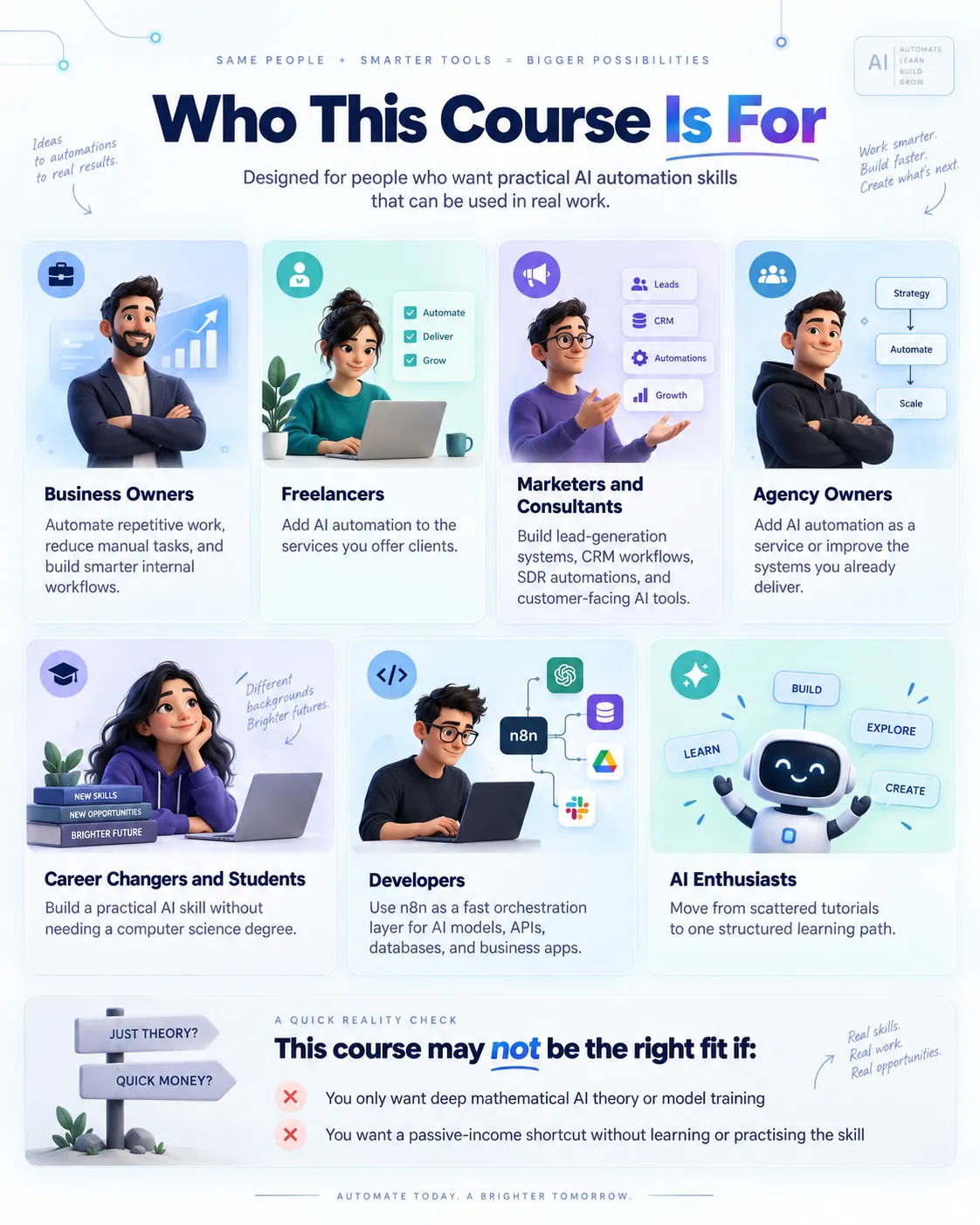
Who is this Course For ?

This course is designed for:

  • Business Owners : If you want to automate repetitive work, reduce manual tasks, and create smarter internal workflows.

  • Freelancers : If you want to add AI automation to the services you offer clients.

  • Marketers and Consultants : If you want to build lead-generation systems, CRM workflows, SDR automations and customer-facing AI tools.

  • Agency Owners : If you want to add AI automation as a service or improve the systems you already deliver.

  • Career Changers and Students : If you want to build a practical AI skill without needing a computer science degree.

  • Developers : If you want to use n8n as a fast orchestration layer for AI models, APIs, databases and business applications.

  • AI Enthusiasts : If you’ve watched scattered tutorials and now want one structured learning path.

This course may not be the right fit if:

- You only want deep mathematical AI theory or model training

- You want a passive-income shortcut without learning or practising the skill
What You Need Before You Start

You do not need previous n8n experience.

You do not need coding experience.

You’ll need:

  • A computer

  • A normal internet connection

  • An n8n Cloud trial to get started

  • Accounts for any external tools you choose to use

Most of the services used in the course offer free tiers or low-cost entry options.

The course also covers cost optimisation and alternative AI providers.

Later in the course, you’ll learn how to self-host n8n using Docker.

Frequently Asked Questions

Q:

Do I need coding experience or previous n8n experience before starting?

No. The course is designed to take you from the fundamentals through more advanced AI automation systems in a structured way.

You begin with core concepts such as AI agents, n8n workflows, nodes, triggers, APIs, tool calling, authentication, JSON, and workflow logic. From there, the course gradually moves into voice agents, RAG, vector databases, self-hosting, MCP, multi-agent systems, and business automation.

You will work with technical concepts, but you do not need to be a programmer to begin. The emphasis is on building visually in n8n and understanding how the pieces connect.

Q:

Will this course help me get clients, a job, or automate my own business?

If you run a business, you can use the workflows to automate repetitive operations, communications, lead handling, research, CRM activity, and internal processes.

If you are a freelancer, consultant, or agency owner, the course can help you develop AI automation services that you can demonstrate to clients.

If you are learning for career development, you will build experience with modern AI automation concepts and tools that can be used in portfolio projects and technical interviews.

However, the course does not guarantee a specific job, client, income level, or business result. The value comes from the skills you build and how effectively you apply them.

Q:

What exactly will I be able to build by the end of the course?

You will build a wide range of practical AI-powered systems rather than just watching demonstrations.

Projects and workflows include:

  • AI agents in n8n

  • Gmail reply agents

  • Google Sheets and Google Drive automations

  • Slack and Telegram bots

  • Notification workflows

  • Voice agents with ElevenLabs

  • Voice-agent workflows connected through Twilio

  • RAG systems using Supabase and embeddings

  • Document-aware AI workflows

  • Self-hosted n8n environments

  • Local AI workflows with Ollama and DeepSeek

  • MCP servers and MCP integrations

  • Lead-generation systems

  • CRM and Pipedrive automations

  • SDR and sales agents

  • Demo-booking workflows

  • Multi-agent systems

  • A complete voice-agent CRM capstone

The goal is to help you move from isolated AI tools to complete automation systems that can perform useful work.

Q:

Which tools and platforms are covered in the course?

The course covers a broad AI automation stack rather than focusing on one platform.

You will work with or learn how to integrate tools such as:

  • n8n Cloud

  • Self-hosted n8n

  • Docker

  • OpenAI

  • OpenRouter

  • DeepSeek

  • Ollama

  • ElevenLabs

  • Twilio

  • Supabase

  • Firecrawl

  • Pipedrive

  • Google Sheets

  • Google Drive

  • Gmail

  • Google Calendar

  • Slack

  • Telegram

  • Pushover

You will also work with important underlying concepts such as APIs, OAuth2, webhooks, HTTP requests, JSON, embeddings, vector databases, RAG, MCP, structured outputs, and tool calling.

Most of these services offer free tiers, trials, or low-cost entry options, although some API usage may have separate provider charges.

Q:

Is this course suitable for beginners, or is it mainly for advanced learners?

It is suitable for both. Beginners can start from Section 1, where the course covers the foundations of AI agents and n8n before introducing more advanced concepts.

More experienced learners who already understand n8n, APIs, or LLM workflows can move faster through the early material and focus on later topics such as:

  • Voice AI

  • RAG

  • Vector databases

  • Self-hosting

  • MCP

  • Context engineering

  • Agent security

  • Structured outputs

  • Multi-agent orchestration

  • Sales automation

The course is designed as a progression, so you can follow it from beginning to end or use it as a structured reference for the areas you need most.

Q:

How is the course delivered, and can I download the lessons?

The course is hosted on Thinkific and is fully self-paced.

It includes:

  • 85 video lessons

  • Approximately 14 hours of training

  • 3 structured sections

  • 15 learning days

  • Progress tracking

  • Desktop, tablet, and mobile access

  • Downloadable video lessons for offline viewing

You can stream the lessons online or download them and learn at your own pace.

There is no fixed class schedule or live cohort requirement, so you can complete the course around your own availability.

Get in touch with us

Have a question about courses, learning paths, or where to start? We’re here to help. If you’re unsure which skill track fits your goal, reach out and we’ll guide you with clear recommendations based on your current level and what you want to achieve.

You can message us anytime for course details, upcoming program updates, pricing, and access. For faster support, share your goal (job, freelance, business growth, or skill upgrade) and we’ll respond with the best next steps.

  • +44 7470 591157

  • 46 Stuart Road, RIchmond, Surrey, England, TW10 7QR

  • Monday - Friday, 8:00 am - 5:00 pm (UTC)

Follow Us

Upgrade your skills with structured digital learning built for real progress. Explore in-demand online video course, follow clear step-by-step paths, and keep improving with clarity. Whether you’re a student, professional, or creator—start today and build skills that truly matter.

Contact Us

  • +44 7470 591157

  • 46 Stuart Road, RIchmond, Surrey, England, TW10 7QR

  • Monday - Friday, 8:00 am - 5:00 pm

© Copyright 2026. All rights reserved. DigitalSkillOrbit is a trading name of TeamForge Marketing Advisory LTD, Registered in England & Wales No. 17379672